
Table of Contents
ToggleClipboard Manager for Windows, macOS & Linux
Stop losing important copied text.
JT Clipboard Manager automatically saves your clipboard history, making it easy to find, organize, and reuse copied content whenever you need it.
Whether you’re a developer, business professional, writer, marketer, customer support agent, or student, JT Clipboard Manager helps you work faster and stay organized.
Never Lose Copied Text Again
Every time you copy text, JT Clipboard Manager safely stores it in your clipboard history.
No more accidentally overwriting important content or losing copied information.
Powerful Clipboard History Manager
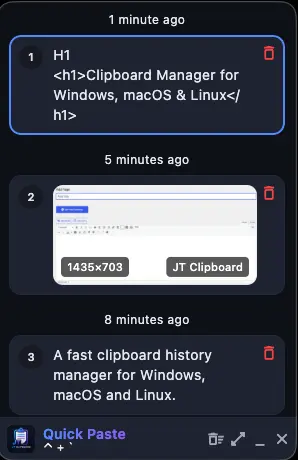
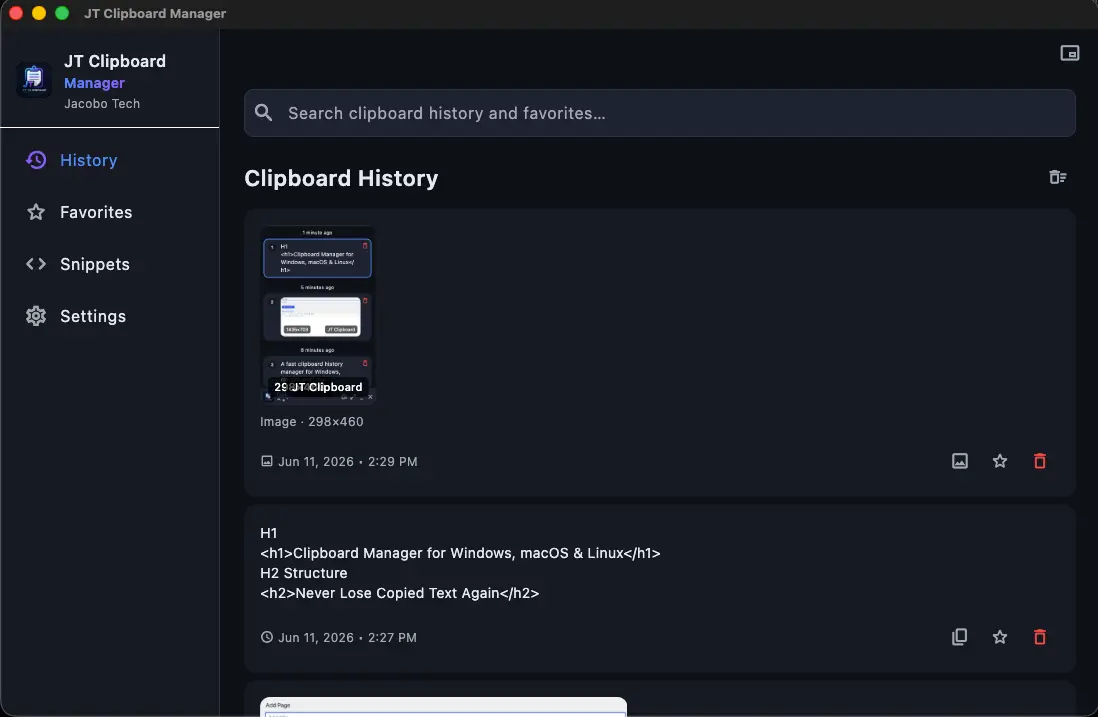
Browse your complete clipboard history in a clean and modern desktop interface.
Quickly access previous clipboard entries and reuse them with a single click.
Features include:
Clipboard History
Instant Search
Favorites
Snippets
Export & Import
Global Hotkeys
Search Thousands of Clipboard Entries Instantly
Built with performance in mind, JT Clipboard Manager allows you to search thousands of clipboard records in real time.
Find exactly what you copied in seconds.
Save Favorites and Reusable Snippets
Store frequently used text, email templates, addresses, code snippets, customer responses, and business content.
Access your favorite items instantly whenever you need them.
Designed for Productivity Professionals
JT Clipboard Manager is ideal for:
Developers
Content Creators
Customer Support Teams
Sales Professionals
Business Owners
Students
Remote Workers
Office Professionals
Available for Windows, macOS and Linux
One application. Multiple platforms.
JT Clipboard Manager works across:
Windows
macOS
Linux
Enjoy the same fast and reliable clipboard experience wherever you work.
Download JT Clipboard Manager Free
Start with the free version and experience a faster, smarter clipboard workflow.
Upgrade to Pro anytime to unlock advanced productivity features including unlimited clipboard history, snippets, export/import tools, and more.
JT Clipboard Manager is designed for people who copy and paste information all day long. Whether you’re writing emails, coding, managing customer conversations, creating content, handling support tickets, or working with repetitive text, JT Clipboard Manager helps you save time and stay productive.
Built by Jacobo Tech.
Why Use a Clipboard Manager?
Most people copy and paste information dozens or even hundreds of times every day. Important text can easily be lost when a new item replaces the current clipboard content.
JT Clipboard Manager solves this problem by automatically saving your clipboard history and making it available whenever you need it. Instead of worrying about losing copied information, you can focus on your work and quickly retrieve previously copied content with a simple search.
Whether you’re working with documents, spreadsheets, emails, customer conversations, programming code, research notes, or business information, JT Clipboard Manager helps you stay organized and efficient.
Increase Productivity Every Day
Small interruptions can have a major impact on productivity. Searching for previously copied text, rewriting repetitive messages, or recreating lost information wastes valuable time throughout the day.
JT Clipboard Manager allows you to instantly access clipboard history, favorite important items, and store reusable snippets. This helps reduce repetitive work and improves workflow efficiency.
Many professionals rely on clipboard managers as one of their most important productivity tools because they simplify everyday tasks and reduce unnecessary interruptions.
Perfect for Developers
Software developers frequently copy code snippets, commands, API endpoints, configuration settings, database queries, and documentation links.
JT Clipboard Manager provides a simple way to store and search these items, helping developers work faster without constantly switching between applications or searching through old notes.
The built-in search functionality makes it easy to locate copied content within seconds.
Great for Business Professionals
Business users often work with customer information, email templates, addresses, invoices, reports, and repetitive communication.
JT Clipboard Manager helps keep this information accessible and organized while reducing the amount of repetitive typing required each day.
Sales teams, customer support agents, virtual assistants, and office professionals can significantly improve productivity using clipboard history and reusable snippets.
Privacy-Focused Clipboard Storage
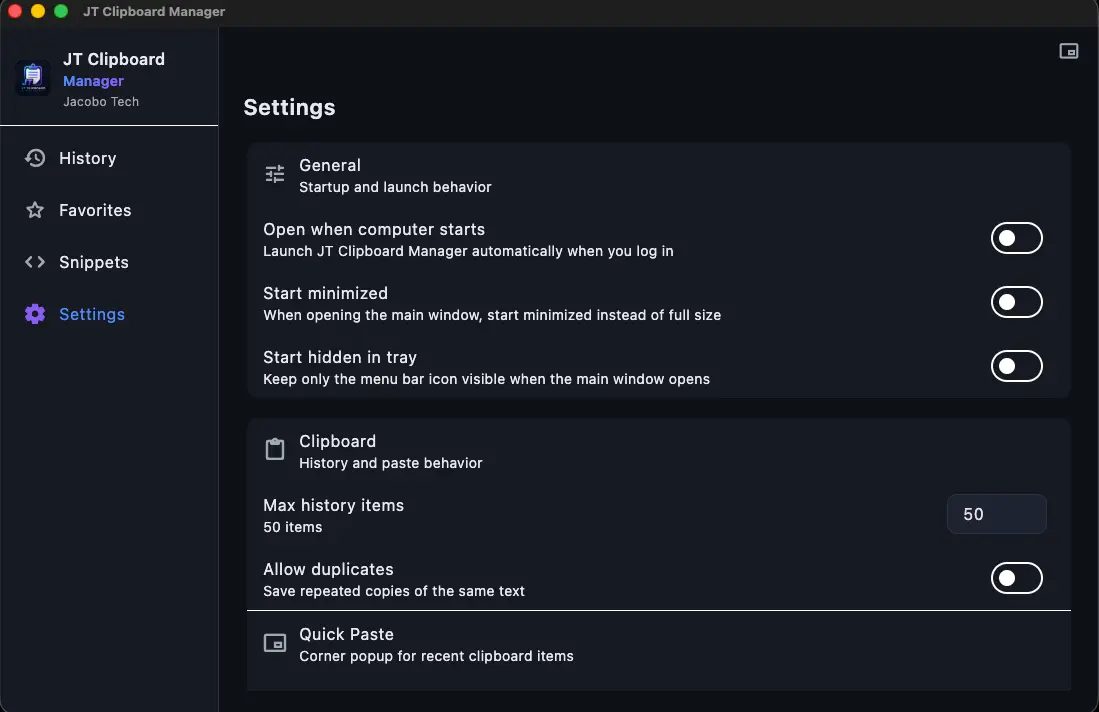
Your clipboard data is stored locally on your computer.
JT Clipboard Manager is designed with privacy in mind and does not require cloud synchronization to function. Your clipboard history remains under your control and is available even when working offline.
This approach provides a fast, lightweight, and reliable clipboard management experience across all supported platforms.
Cross-Platform Desktop Experience
JT Clipboard Manager is available for Windows, macOS, and Linux.
No matter which operating system you use, you can enjoy the same modern interface, powerful search capabilities, clipboard history management, and productivity features.
The application is designed specifically for desktop users who need a reliable clipboard manager that works efficiently without unnecessary complexity.
Start Using JT Clipboard Manager Today
If you’re tired of losing copied text, searching for recently copied information, or repeating the same copy-and-paste tasks every day, JT Clipboard Manager can help.
Download the free version today and discover a smarter way to manage clipboard history, improve productivity, and organize your workflow.
Upgrade to Pro whenever you’re ready to unlock advanced features and take your productivity to the next level.